Here’s something that’ll blow your mind: the way fintech companies decide whether to lend you money is getting a serious upgrade. And I’m not talking about minor tweaks to old formulas — I’m talking about reinforcement learning algorithms that literally learn from every lending decision they make.
Best ML Experiment Tracking Tools Compared (Paid vs Free)
on
Get link
Facebook
X
Pinterest
Email
Other Apps
I’ve lost count of how many times I’ve seen brilliant ML engineers frantically searching through Git commits, trying to figure out which hyperparameters produced those amazing results from last Tuesday. One guy on my team literally kept an Excel spreadsheet with 300+ rows of experiment configs. It was chaos. Then we tried every experiment tracking tool on the market, and let me tell you — some are absolute game-changers while others are just expensive noise.
Experiment tracking tools are supposed to solve one problem: keeping track of what you tried, what worked, and why. But the market is flooded with options, each claiming to be the best. Some are free and powerful, others cost a fortune and deliver mediocre features. After burning through three years and countless corporate budgets testing these tools, I know which ones are worth your time.
Let me save you the trial-and-error and show you what actually works.
What Makes a Good Experiment Tracking Tool?
Before we dive into specific tools, let’s establish what actually matters. Not marketing fluff — real features you’ll use daily.
Core requirements:
Automatic logging: If I have to manually log everything, I’m not using it
# Log metrics during training
for epoch in range(epochs):
    loss = train_epoch()
    wandb.log({"loss": loss, "epoch": epoch})
# Save model
wandb.save("model.h5")
That’s it. Your experiments now appear in a gorgeous web dashboard with interactive plots, system metrics, and full reproducibility.
Pros:
Best-in-class UI — it’s genuinely beautiful
Real-time updates while training
Fantastic documentation and examples
Active community and quick support
Sweeps feature for hyperparameter tuning is chef’s kiss
Cons:
Free tier requires your projects to be public (dealbreaker for some companies)
Can get expensive at scale ($50/user/month adds up fast)
You’re locked into their cloud (self-hosted option exists but it’s pricey)
Sometimes feels like overkill for simple projects
Best for: Teams that value polish and collaboration, companies willing to pay for quality, researchers who want public portfolios
My take: W&B is the gold standard. If you can afford it and don’t mind cloud hosting, this is what you should use. The free tier is perfect for students and hobbyists.
MLflow: The Open Source Champion
MLflow is what you use when you want complete control and zero vendor lock-in. It’s open source, self-hosted, and totally free. Forever.
What You Get (Always Free)
Everything. MLflow is 100% open source:
Experiment tracking with metrics, params, and artifacts
with mlflow.start_run():
    # Log parameters
    mlflow.log_param("learning_rate", 0.001)
    mlflow.log_param("batch_size", 64)

    # Train and log metrics
    for epoch in range(epochs):
        loss = train_epoch()
        mlflow.log_metric("loss", loss, step=epoch)

    # Log model
    mlflow.sklearn.log_model(model, "model")
MLflow runs locally or on your own servers. The UI is functional but basic — think “engineering tool” not “product showcase.”
Pros:
Completely free and open source
No vendor lock-in — you own everything
Works offline and behind firewalls
Integrates with everything (seriously, everything)
Model registry is legitimately useful
Managed offerings available from Databricks if you want cloud
Cons:
UI is… let’s call it “utilitarian” (it’s ugly)
You manage the infrastructure (servers, databases, backups)
Limited collaboration features compared to commercial tools
No built-in hyperparameter optimization
Documentation can be spotty
Best for: Companies that need full control, teams with DevOps resources, projects with strict data privacy requirements, anyone allergic to subscription fees
My take: MLflow is the sensible choice for production ML systems. It’s not flashy, but it’s rock-solid and you’ll never get a surprise bill. Just budget time for infrastructure management.
TensorBoard came with TensorFlow and it’s still going strong. It’s free, it’s simple, and if you’re already using TensorFlow or PyTorch, it’s already installed.
for epoch in range(epochs):
    loss = train_epoch()
    writer.add_scalar('Loss/train', loss, epoch)
    writer.add_scalar('Accuracy/train', acc, epoch)
writer.close()
# Launch TensorBoard
# tensorboard --logdir=runs
TensorBoard runs locally in your browser. It’s simple, fast, and does one thing well.
Pros:
Completely free and lightweight
Zero setup if you use TensorFlow/PyTorch
Great for visualizing training progress
No internet connection required
Model graph visualization is actually useful
Cons:
Not really designed for experiment comparison
No collaboration features (it’s local-only by default)
Limited artifact management
Organizing experiments gets messy with many runs
UI hasn’t evolved much in years
Best for: Solo developers, quick prototyping, people who just want to watch loss curves, anyone doing serious TensorFlow/PyTorch work
My take: TensorBoard is perfect for what it is — a training monitor. Don’t expect it to manage hundreds of experiments or facilitate team collaboration. Use it for development, graduate to something else for production.
Neptune.ai: The Organized Alternative
Neptune is like W&B’s more organized, slightly less flashy cousin. It focuses on experiment organization and metadata management.
What You Get (Free Tier)
100 hours of compute tracking per month
100 GB storage
Unlimited projects and experiments
Team collaboration
All core features
The free tier is generous for individuals but restrictive for teams.
What You Get (Paid Tier)
Starting at $59/month per user:
More compute hours and storage
Advanced collaboration features
Priority support
Custom integrations
The Neptune Experience
python
import neptune
# Initialize
run = neptune.init_run(
    project="workspace/project",
    api_token="YOUR_TOKEN"
)
for epoch in range(epochs):
    run["train/loss"].append(loss)
    run["train/accuracy"].append(acc)
# Stop tracking
run.stop()
Neptune’s UI emphasizes organization — tags, filtering, and comparison tools are first-class citizens.
Pros:
Excellent metadata organization
Strong emphasis on reproducibility
Good model registry features
Integrates well with Jupyter notebooks
More affordable than W&B for small teams
Cons:
UI is functional but less polished than W&B
Smaller community than W&B or MLflow
Free tier compute hours can run out quickly
Some features feel half-baked compared to competition
Best for: Teams that prioritize organization over flash, companies wanting W&B features at lower cost, people who love metadata :)
My take: Neptune is solid but stuck in the middle. It’s better than MLflow’s UI but not as good as W&B’s. It costs less than W&B but isn’t free like MLflow. It’s a perfectly fine tool that I never feel excited to recommend.
Comet ML: The Feature-Rich Underdog
Comet has been around forever and keeps adding features. Sometimes too many features, IMO.
What You Get (Free Tier)
Unlimited experiments
100 MB storage per experiment
Basic collaboration
All core tracking features
The free tier is usable but storage limits are annoying.
for epoch in range(epochs):
    experiment.log_metric("loss", loss, step=epoch)
experiment.end()
Comet tries to do everything — experiment tracking, model monitoring, dataset versioning, AutoML, you name it.
Pros:
Tons of features (model monitoring, data lineage, AutoML)
Cheaper than W&B
Good integration ecosystem
Decent free tier for individuals
Cons:
UI feels cluttered with so many features
Storage limits on free tier are restrictive
Feature bloat makes it overwhelming for beginners
Documentation quality varies wildly
Best for: Teams that want an all-in-one platform, companies that need production monitoring alongside experiment tracking, people who like feature-rich tools
My take: Comet is like that Swiss Army knife with 50 attachments — theoretically useful, practically awkward. The core tracking works fine, but I find myself fighting the UI instead of enjoying it.
Sacred: The Minimalist’s Choice
Sacred is different — it’s not a platform, it’s a Python library. You run it locally and store data wherever you want (MongoDB, files, whatever).
Best for: Researchers who value reproducibility above all, teams with strict data privacy requirements, anyone running experiments on air-gapped systems, minimalists who hate unnecessary complexity
My take: Sacred is brilliant for what it does — perfect experiment capture with zero bloat. But you’ll need additional tools for visualization and collaboration. I use it for academic projects where reproducibility is critical.
DVC + Studio: Data Scientist’s Git
DVC (Data Version Control) isn’t primarily an experiment tracker — it’s Git for data. But DVC Studio adds experiment tracking on top.
What You Get (Free Tier — DVC)
DVC itself is 100% free and open source:
Data and model versioning
Pipeline management
Experiment tracking via Git
Works with any storage (S3, GCS, local, etc.)
What You Get (DVC Studio)
The cloud UI is free for public repos, paid for private:
Web UI for experiment comparison
Visualization tools
Collaboration features
Starting at $35/month for teams
The DVC Experience
bash
# Initialize DVC
dvc init
# Track data
dvc add data/dataset.csv
git add data/dataset.csv.dvc
Not designed for deep learning (better for traditional ML)
Studio features lag behind W&B/Neptune
Collaboration requires Git knowledge
Best for: Data scientists who love Git workflows, teams already using DVC for data versioning, projects where data versioning matters as much as experiment tracking
My take: DVC is incredible for data versioning. The experiment tracking feels like an add-on (because it is). If you need both data versioning and experiment tracking, DVC is perfect. Otherwise, dedicated experiment trackers work better.
ClearML: The Self-Hosted Powerhouse
ClearML (formerly Allegro Trains) is open source with enterprise features. Think MLflow but with better UX and more features.
What You Get (Open Source)
Everything in the open source version:
Experiment tracking and comparison
Model registry
Data management
Remote execution orchestration
Web UI included
What You Get (Hosted/Enterprise)
They offer hosted service and enterprise features:
Managed infrastructure
Advanced access controls
Priority support
SLAs and compliance
Pricing isn’t public — you have to contact sales (always a red flag, FYI).
# Get config
params = {'learning_rate': 0.001, 'batch_size': 64}
task.connect(params)
# Log metrics
for epoch in range(epochs):
    task.logger.report_scalar("loss", "train", iteration=epoch, value=loss)
ClearML auto-captures a lot — imports, uncommitted changes, environment variables. Sometimes too much.
Pros:
Powerful open source offering
Self-hosted with nice UI
Auto-captures tons of context
Good orchestration features for running experiments remotely
Model registry and data management included
Cons:
UI can be overwhelming
Auto-capture sometimes too aggressive
Documentation quality varies
Enterprise pricing is opaque
Smaller community than MLflow
Best for: Teams wanting self-hosted solution with better UX than MLflow, companies needing orchestration + tracking, people who want open source but polished
My take: ClearML is impressive but tries to do too much. The experiment tracking is solid, but you’re also getting orchestration, data management, and deployment tools whether you want them or not. Great if you need all that, overkill if you just want tracking.
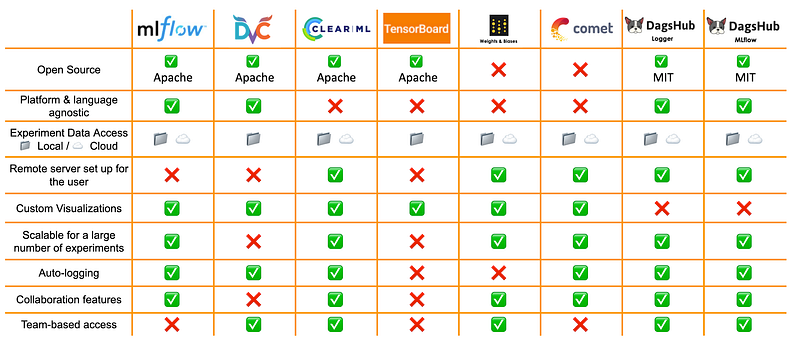
The Comparison Matrix
Let me break this down in a way that’s actually useful:
For Solo Developers/Students
Best choice: Weights & Biases (free tier) or TensorBoard Runner-up: Sacred + Omniboard Why: W&B’s free tier is generous and the UI is fantastic. TensorBoard is already installed and works great for watching training.
For Small Teams (2–5 people)
Best choice: MLflow (self-hosted) or Neptune Runner-up: Weights & Biases (if budget allows) Why: MLflow is free and you control everything. Neptune is affordable and designed for teams. W&B is better but $250+/month might sting.
For Medium Teams (5–20 people)
Best choice: Weights & Biases or MLflow Runner-up: ClearML or Neptune Why: W&B shines with team features. MLflow saves money if you have DevOps capacity. ClearML splits the difference.
For Large Companies
Best choice: MLflow (self-hosted) or W&B Enterprise Runner-up: ClearML Enterprise Why: At scale, vendor costs explode. MLflow’s open source model wins financially. W&B Enterprise is worth it if collaboration is critical.
For Strict Privacy Requirements
Best choice: MLflow or Sacred Runner-up: ClearML Why: Self-hosted, no data leaves your network, complete control. End of discussion.
For Research/Academia
Best choice: Weights & Biases (free tier) or Sacred Runner-up: TensorBoard Why: W&B free tier is perfect for papers and public portfolios. Sacred gives perfect reproducibility for rigorous research.
Real Talk: What I Actually Use
Different projects, different tools. Here’s my actual setup:
Personal projects: Weights & Biases free tier. The UI is too good to pass up, and I like having a public portfolio.
Client work: MLflow. Clients don’t want their data in the cloud, and I don’t want to explain subscription fees. MLflow just works.
Research papers: Sacred. Perfect reproducibility matters more than pretty dashboards when reviewers are involved.
After three years and way too much money spent on subscriptions, here’s what I know: there’s no “best” experiment tracking tool. There’s the best tool for your situation.
Weights & Biases is gorgeous and powerful — if you can afford it. MLflow is bulletproof and free — if you can manage it. Sacred is perfect for reproducibility — if you don’t need collaboration. TensorBoard works great — if your needs are simple.
The Excel spreadsheet my teammate was using? We moved him to W&B and his productivity skyrocketed. But another client with strict compliance requirements? MLflow was the only option, and it worked perfectly.
Pick based on your constraints, not hype. Every tool on this list will track your experiments. The question is which one fits your budget, your team, and your workflow. Answer that honestly, and you’ll be fine.
Now stop researching tools and go train some models. Your experiments aren’t tracking themselves (yet).

Comments
Post a Comment