Here’s something that’ll blow your mind: the way fintech companies decide whether to lend you money is getting a serious upgrade. And I’m not talking about minor tweaks to old formulas — I’m talking about reinforcement learning algorithms that literally learn from every lending decision they make.
Premium Python ML Tools and Paid Libraries Compared
on
Get link
Facebook
X
Pinterest
Email
Other Apps
You’re building an ML system for production. The free libraries are working fine, but you keep hearing about “enterprise-grade” tools that supposedly solve all the problems you’re facing. DataRobot promises automated ML. Databricks claims to handle everything at scale. Your manager sees these marketing decks and asks why you’re not using “professional tools.” Meanwhile, you’re wondering if these paid solutions actually deliver value or if they’re just expensive wrappers around the open-source tools you already use.
I’ve worked with both sides — built systems using entirely free tools and evaluated premium platforms for enterprise clients. Here’s the truth: most paid Python ML tools aren’t worth the money for most teams. But for specific use cases and at certain scales, they solve real problems that open-source alternatives can’t. Let me break down what’s actually worth paying for and what’s just overpriced marketing.
Premium Python ML Tools and Paid Libraries
Understanding the Premium ML Landscape
Before we compare specific tools, understand what you’re actually paying for:
What premium tools claim to offer:
Automated ML (AutoML) that finds optimal models
Enterprise-grade reliability and support
Better scaling and performance
Integrated workflows and platforms
Compliance and governance features
Professional support and SLAs
What you’re often actually getting:
Wrappers around open-source libraries
Managed infrastructure (which you could set up yourself)
GUI interfaces (convenient but not essential)
Vendor lock-in
Expensive licensing based on usage or seats
The question isn’t “is it better than free?” It’s “is it enough better to justify the cost?”
The Free Baseline (What You Get for $0)
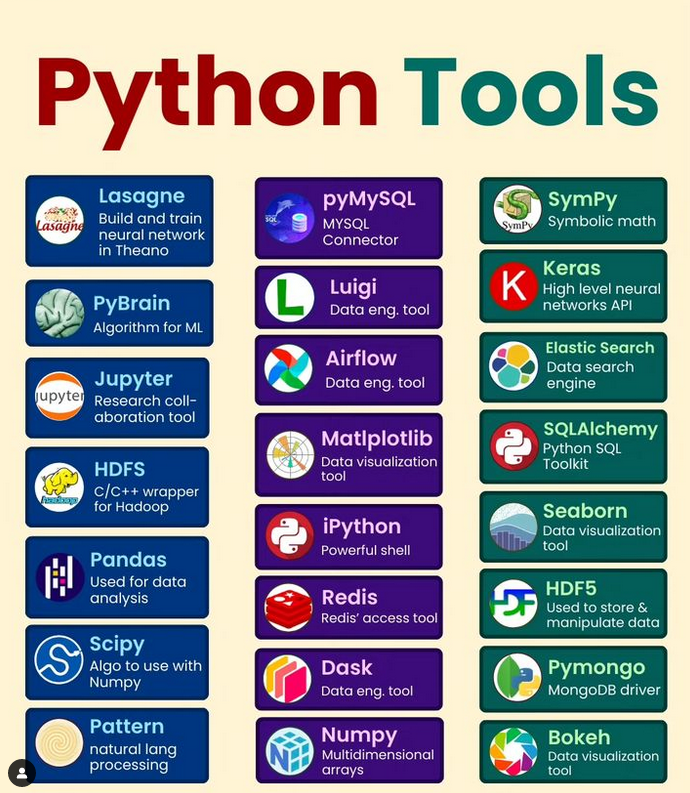
Before considering paid tools, recognize what’s already freely available:
This stack can build and deploy production ML systems at significant scale. Companies like Spotify and Uber run massive ML operations primarily on open-source tools.
So what are you paying for with premium tools? Let’s find out.
AutoML Platforms (Automated Machine Learning)
These promise to automate the model building process:
DataRobot ($50,000-$500,000+/year)
What it claims: Complete automated ML platform that builds, deploys, and monitors models automatically.
What it actually delivers:
Automated feature engineering
Algorithm selection and hyperparameter tuning
Model interpretation and explainability
Deployment pipelines
Monitoring and drift detection
GUI for non-technical users
The good:
Genuinely fast prototyping
Good for teams with limited ML expertise
Enterprise support and compliance features
MLOps infrastructure included
Reduces time to first model significantly
The not-so-good:
Extremely expensive
Black box for model building
Limited customization
Vendor lock-in
Often doesn’t outperform well-tuned open-source models
Pricing scales painfully with usage
Free alternatives:
Auto-sklearn: Bayesian optimization of scikit-learn models
TPOT: Genetic algorithm approach to AutoML
AutoKeras: Neural architecture search
H2O.ai AutoML: Free open-source option
Honest verdict: DataRobot makes sense if you have budget, need to move very fast, and have limited ML expertise in-house. For teams with competent ML engineers, the cost rarely justifies the convenience. IMO, you’re paying $100K+ for something Auto-sklearn gives you 80% of for free.
Worth it when:
Your team lacks ML expertise but has budget
Time to market matters more than cost
Compliance/governance features are critical
You need vendor support and SLAs
Get clear, high-res images with AI Free : Click Here
H2O Driverless AI ($25,000-$100,000+/year)
What it offers: AutoML platform similar to DataRobot but more affordable.
The good:
Significantly cheaper than DataRobot
Good automatic feature engineering
Reasonable model performance
Some customization possible
The not-so-good:
Still expensive for what it is
Less polished than DataRobot
Smaller ecosystem and community
Free alternative: H2O.ai open-source version gives you much of the functionality free.
Honest verdict: If you need commercial AutoML, H2O is better value than DataRobot. But honestly, for most cases, the open-source H2O or other free alternatives suffice.
Worth it when: You need enterprise AutoML but can’t justify DataRobot pricing.
Unified ML Platforms
These aim to be all-in-one solutions:
Databricks ($0.40-$1.50 per DBU, scales with usage)
What it claims: Unified analytics platform for data engineering, ML, and business intelligence.
What it actually delivers:
Managed Apache Spark clusters
Collaborative notebooks
MLflow integration
Delta Lake for data reliability
AutoML capabilities
Production job scheduling
The good:
Excellent for large-scale data processing
Collaboration features are solid
Integrates data engineering and ML well
Good when you’re already in Azure/AWS
MLflow is genuinely useful
The not-so-good:
Costs explode with scale
Over-complicated for small teams
Much of it is managed open-source (Spark, MLflow)
Vendor lock-in to Databricks ecosystem
Can be 3–5x more expensive than managing yourself
Free alternatives:
Self-managed Spark clusters
JupyterHub for collaborative notebooks
MLflow (open-source, can self-host)
Airflow for orchestration
Honest verdict: Databricks makes sense at scale (multi-TB datasets, large teams) where managing infrastructure becomes expensive. For smaller operations, you’re paying premium prices for convenience. The free tier exists but becomes expensive fast in real usage.
Worth it when:
Processing terabytes of data regularly
Large data science team needing collaboration
Already heavily invested in cloud infrastructure
Infrastructure management isn’t your core competency
Google Cloud Vertex AI (Pay-as-you-go)
What it offers: Managed ML platform on Google Cloud.
The good:
Tight integration with Google Cloud services
AutoML capabilities
Model deployment and serving
Pre-trained models available
Scales automatically
The not-so-good:
Google Cloud lock-in
Can get expensive with usage
Less flexible than self-managed solutions
Documentation sometimes lacking
Free alternatives: Self-hosted TensorFlow/PyTorch with Kubernetes for deployment.
Honest verdict: If you’re already on Google Cloud and need managed ML infrastructure, Vertex AI is reasonable. Otherwise, it’s hard to justify.
Worth it when: Deeply integrated with Google Cloud ecosystem and need managed infrastructure.
Feature Store Solutions
These manage features for ML models:
Tecton ($50,000+/year estimated)
What it claims: Enterprise feature platform for real-time ML.
What it delivers:
Feature serving infrastructure
Feature versioning and lineage
Real-time and batch features
Monitoring and validation
The good:
Solves real feature engineering pain points
Good for teams with many models
Real-time serving is well-designed
The not-so-good:
Very expensive
Overkill for most use cases
Adds significant complexity
Free alternatives:
Feast (open-source feature store)
Build your own with Redis + data warehouse
Honest verdict: Feature stores solve real problems at scale, but most teams don’t need them. Feast gives you 80% of the functionality for free. FYI, I’ve seen companies spend $100K on Tecton when they had 3 models in production. That’s insane.
Worth it when:
Running 50+ production models
Real-time serving is critical
Feature reuse across teams is complex
You have the budget and team size to justify it
Experiment Tracking and Model Registry
These help manage the ML lifecycle:
Comet ML (Starts at $20/month/user)
What it offers: Experiment tracking, model registry, and monitoring.
Honest verdict: Comet ML is actually reasonably priced and better UX than MLflow. If $20/user/month fits your budget and you want polish, it’s worth considering. But MLflow works fine and is free.
Worth it when:
Small team wanting better UX than MLflow
Budget allows for tooling improvements
Don’t want to manage infrastructure
Weights & Biases (Free tier, paid starts at $50/month)
What it offers: Experiment tracking, hyperparameter optimization, model versioning.
The good:
Generous free tier
Excellent visualization
Good community
Easy integration
The not-so-good:
Paid tiers get expensive
Data stored on their servers
Can be slow with very large experiments
Free alternative: MLflow, TensorBoard
Honest verdict: W&B’s free tier is legitimately good. For individuals and small teams, stay on free tier. Paying makes sense only for larger teams needing collaboration features.
Worth it when: Free tier isn’t enough and you need team collaboration features.
Data Labeling Platforms
For supervised learning, you need labeled data:
Scale AI (Custom pricing, typically $0.08-$0.50 per label)
What it claims: High-quality data labeling at scale.
What it delivers:
Human labelers for your data
Quality control processes
Fast turnaround
Various data types supported
The good:
Actually high quality
Faster than building labeling team
Scales quickly
Good for complex labeling tasks
The not-so-good:
Expensive (easily $10K+ for real projects)
Less control over quality
Data leaves your infrastructure
Ongoing cost with new data
Free/cheap alternatives:
Label Studio (open-source, self-host)
Amazon Mechanical Turk (cheaper human labeling)
Internal labeling teams
Honest verdict: This is one area where paid services genuinely add value. Quality data labeling is hard, and Scale AI does it well. If you need thousands of quality labels, they’re worth considering.
Worth it when:
Need large amounts of quality labeled data
Complex labeling tasks
Don’t have internal labeling capacity
Speed matters
Labelbox (Starts at $600/month)
What it offers: Data labeling platform with project management.
The good:
Good interface
Project management features
Quality control tools
Cheaper than Scale AI if using own labelers
The not-so-good:
Still expensive
Monthly cost even without active labeling
Free alternative: Label Studio (open-source)
Honest verdict: If you have your own labeling team, Labelbox’s platform features might be worth it. But Label Studio is free and quite capable. :/
Worth it when: Managing complex labeling projects with internal teams.
Monitoring and Observability
Tracking model performance in production:
Arize AI (Custom pricing)
What it claims: ML observability and monitoring platform.
What it delivers:
Model performance monitoring
Data drift detection
Explainability features
Alerting systems
The good:
Comprehensive monitoring
Good drift detection
Nice visualizations
The not-so-good:
Expensive for what it is
Can build similar yourself
Another vendor to manage
Free alternatives:
Evidently (open-source monitoring)
SeldonCore (includes monitoring)
Build custom monitoring with Prometheus/Grafana
Honest verdict: Monitoring is important but doesn’t require expensive tools. Open-source options work fine for most cases.
Worth it when: Very large-scale deployments where monitoring failures are extremely costly.
The Tools Actually Worth Paying For
After evaluating dozens of premium tools, here are the few I’d actually recommend spending money on:
1. Weights & Biases (Free tier or paid)
Why: Genuinely better UX than free alternatives, generous free tier, reasonable pricing. For: Experiment tracking and hyperparameter optimization
2. Scale AI (When needed)
Why: Quality data labeling is hard. They do it well. For: Large-scale data labeling projects
3. Cloud compute credits (AWS, GCP, Azure)
Why: Sometimes you need massive compute. Cloud is easier than buying hardware. For: Training large models, processing huge datasets
4. Comet ML or Databricks (At scale)
Why: At certain scales, managed services become cost-effective vs. engineering time. For: Large teams with significant ML operations
Everything else? The free alternatives are usually 80–90% as good for 0% of the cost.
When to Actually Buy Premium Tools
Use this decision framework:
Pay for premium tools when:
Engineering time costs more than tool cost
Free alternatives genuinely can’t meet your needs
Vendor support/SLAs are critical
Scale makes DIY infrastructure expensive
Compliance requires certified tools
Stick with free tools when:
Budget is limited (obviously)
You have engineering capacity
You’re still prototyping/experimenting
Scale doesn’t justify managed services
Open-source meets your needs
Most teams should start free and only pay when they hit clear limitations.
The Harsh Reality of Premium ML Tools
Here’s what sales teams won’t tell you:
Most premium ML tools are:
Wrappers around open-source libraries
Managed infrastructure you could build yourself
Solving problems you don’t have yet
Optimized for vendor profit, not customer value
Incredibly expensive relative to actual value provided
The ML tooling market is full of companies selling “enterprise solutions” at enterprise prices to solve problems that free tools already solve. They prey on companies’ fear of missing out and desire to use “professional” tools.
When you actually need premium tools:
Scale genuinely overwhelms DIY approaches
Engineering time is severely constrained
Compliance requires vendor support
Competitive advantage requires speed over cost
For most small to medium teams? The free ecosystem is genuinely excellent. Companies like Netflix, Uber, and Airbnb built their ML systems primarily on open-source tools. If they can do it, you probably can too.
My Honest Recommendations by Team Size
Solo developer/tiny startup:
Use 100% free tools
Don’t even consider paid options yet
Focus on building, not tooling
Small team (5–10 people):
Mostly free tools
Consider W&B paid tier for collaboration
Maybe Cloud compute for big experiments
Avoid everything else
Medium team (10–50 people):
Free tools for most things
Databricks if processing massive data
Scale AI if labeling is bottleneck
Experiment tracking paid tier
Still avoid most premium tools
Large team (50+ people):
Consider managed platforms at this scale
Databricks, Vertex AI, or Sagemaker make sense
Feature stores might be justified
DataRobot if you have non-technical users
Budget exists to optimize for engineering time
The larger you are, the more premium tools become cost-effective. But even large teams can and do operate primarily on open-source tools.
The Bottom Line
The Python ML ecosystem’s open-source offerings are genuinely excellent. NumPy, Pandas, Scikit-learn, TensorFlow, PyTorch — these are world-class tools that power ML at companies of all sizes, all available for free.
Premium tools have their place, but that place is much smaller than sales teams want you to believe. Start with free tools, hit real limitations, then evaluate whether paid solutions solve those specific problems better than free alternatives or custom solutions.
Don’t pay for:
AutoML when you have ML engineers
Managed notebooks when JupyterLab works fine
Feature stores when you have 5 models
Monitoring platforms when Prometheus exists
Tools solving problems you don’t have
Consider paying for:
Data labeling at scale (genuinely hard problem)
Managed infrastructure at scale (engineering time expensive)
Better UX when budget allows (time is money)
Enterprise support when compliance requires it
Most importantly, don’t let marketing convince you that “serious companies” use premium tools. Serious companies use tools that work for their specific needs and budget. Sometimes that’s DataRobot. Usually it’s open-source. There’s no shame in building excellent ML systems entirely with free tools — most successful ML companies did exactly that.
Now stop shopping for expensive tools and go build something with the incredible free tools already at your disposal. Premium tools won’t make you a better ML engineer. Practice, projects, and real-world problem-solving will. :)

Comments
Post a Comment